Build, run and view single simulation
These examples are from docs/examples, where you can run them as script.
All parameters are from macaqueretina/parameters/ yaml files, unless changed in the examples.
This example shows how to build, stimulate, and simulate a small retina patch and see the resulting output.
Note that the plt.show() is necessary to render the figure after all viz commands.
import matplotlib.pyplot as plt
import macaqueretina as mr
mr.load_parameters()
Build retina, make stimulus and simulate
mr.retina_constructor.construct()
mr.stimulus_factory.generate()
mr.retina_simulator.simulate()
Show multiple units for single trial
For all temporal models:
mr.viz.show_all_gc_responses_after_simulate(savefigname=None)
plt.show()
Try the optional argument savefigname="Visualize_fig1.png". This image will be saved into your model_root_path/project/experiment-directory. For available image formats, see matplotlib.pyplot.savefig.
You should get:
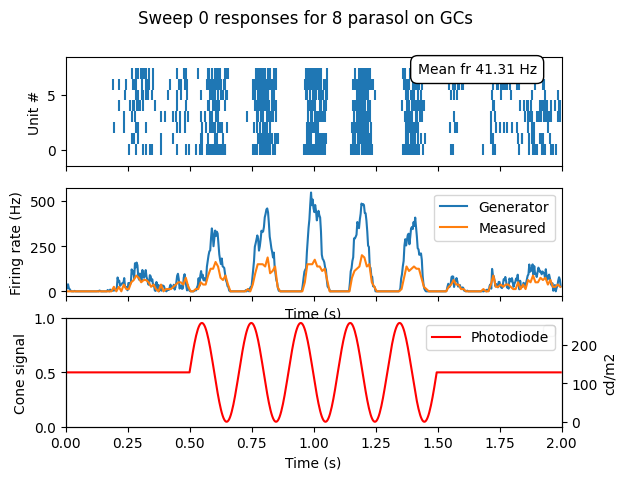
- Top: rasterplot with action potentials.
- Middle: generator potential after nonlinearity (blue) and measured firing rate (orange).
- Bottom: stimulus middle pixel voltage value, normalized to cone signal and luminance.
Next, without quitting the python session (keep the imported mr object), additional viz methods include:
mr.viz.show_all_generator_potentials_after_simulate(savefigname=None)

mr.viz.show_stimulus_with_gcs(
    example_gc=None,  # [int,], None for all
    frame_number=180,  # depends on fps and baseline lengths
    show_rf_id=False,
    savefigname=None,
)

mr.viz.show_single_gc_view(unit_index=2, frame_number=31, savefigname=None)
mr.viz.show_gc_noise_hist_cov_mtx(savefigname=None)
For fixed temporal model only:
mr.viz.show_spatiotemporal_filter_sums(savefigname=None)
mr.viz.show_spatiotemporal_filter(unit_index=1, savefigname=None)
For subunit temporal model only:
mr.viz.show_cone_responses(time_range=[0.0, 1.1], savefigname=None)
Interactive plot of spike frequency on stimulus video
video_file_name = mr.config.visual_stimulus_parameters.stimulus_video_name
response_file_name = next(mr.config.output_folder.glob("*response*.gz"))

window_length = 0.1  # seconds
rate_scale = 20  # Hz, Colorscale max amplitude
mr.viz_response.show_response_with_stimulus_video(
    video_file_name, response_file_name, window_length, rate_scale
)